
AI Video Tools That Take an Instagram Link (and What They Do With It)
Tools that take a link split into two groups doing very different things behind the same interface. What each actually ingests, the quality ceiling of each approach, and what link ingestion cannot solve.
Pasting a URL instead of uploading files is a genuine workflow improvement — the source clip is already on Instagram, and downloading it to re-upload it is pure friction. But "takes a link" describes the input, not the output, and two tools with identical front doors can do completely different things behind them.
Group one: link in, face-only swap out
The $5–15 tier. You paste a Reel URL, the tool pulls the video, and an inswapper-class model composites your face onto the existing performer. Typical envelope: 720p, capped near 15 seconds, watermark on the free path.
What you get back is the original video with a different face. The body, build, hair and wardrobe stay the original performer's. For a frontal talking-head clip that is fine. For anything where the body moves, the mismatch is visible — and it is most visible exactly when the motion becomes interesting, which is usually the reason you picked the clip.
Group two: link in, storyboard or analysis out
A second group ingests the link to understand the video rather than to modify it — scene breakdown, camera angles, pacing, hooks — and hands you a plan to shoot or generate yourself. Useful for learning a format. It does not produce a video.
What is not in either group
Link ingestion combined with full character replacement. The tools that do genuine full-body replacement — where the person is regenerated rather than composited, so wardrobe and proportions follow your reference — are in the $49–220 tier, and they all want two manual uploads: a source clip and a character. None of them takes a URL.
That gap is not an oversight. Ingesting a link means handling downloads, rate limits, formats and takedowns; the premium tools are built for people who already have their footage on disk.
What link ingestion cannot fix
Model policy. A URL does not change what the model accepts. Seedance rejects real human likenesses upstream of every reseller.
A bad source clip. Rapid cuts, two people in frame, cropped limbs — these break motion transfer regardless of how the video arrived. Choosing the right five seconds matters more than any tool setting.
Rights. Being able to fetch a public URL is not permission to reproduce what is in it. Recreating a format is normal creative practice; reproducing someone's likeness or a licensed soundtrack is a separate question.
What the underlying work costs
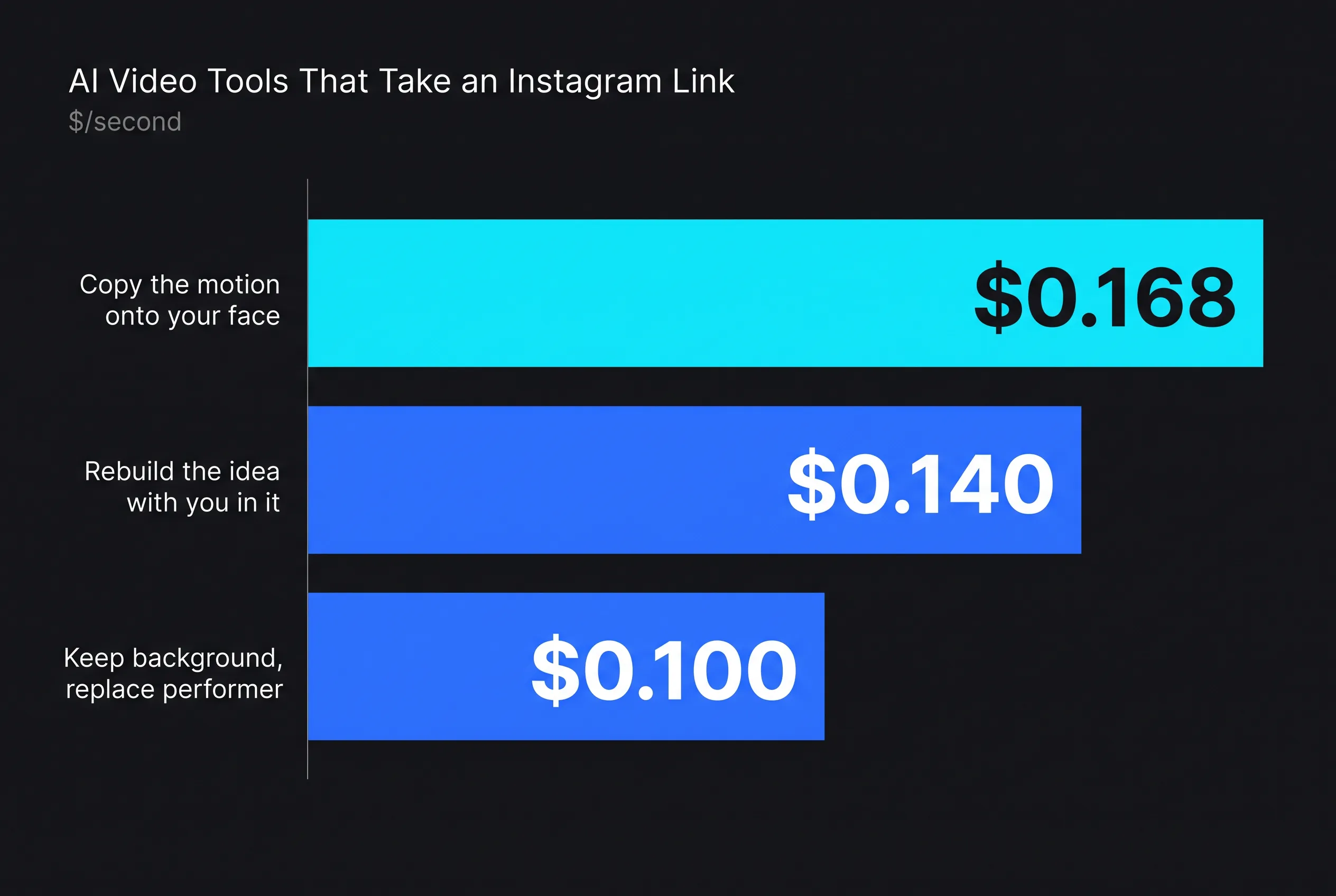
If you skip the wrapper and go to the models, prices read live on 2 August 2026:
| Approach | Model | $/second | 10s |
|---|---|---|---|
| Keep background, replace performer | Wan 2.7 edit-video | $0.100 | $1.00 |
| Copy the motion onto your face | Kling 3.0 Pro Motion Control | $0.168 | $1.68 |
| Rebuild the idea with you in it | HappyHorse 1.1 reference-to-video | $0.140 | $1.40 |
A dollar to $1.70 per clip in compute. What the wrapper sells on top is the decision of which of those three your particular clip needs — which, given that picking wrong is the main reason results disappoint, is not a trivial thing to be selling.
How to do this without code: A link is a valid input here, and the pipeline reads the source video before it plans a single scene. In AutoHustle this is the autopilot: paste the Reel link, add one photo of yourself and confirm the plan (about 4 credits per second of finished video, so 60 credits for a full 15-second call; analysing the Reel is free). See How to put your face in any Reel and Recreate an Instagram Reel.
Related reading: AI Face Swap Tools Compared 2026: The $15 Tier vs the $99 Tier · ChatGPT Can Analyse a Reel. It Cannot Rebuild One With Your Face.
For developers: the fal endpoints behind this article
Prices in the article are per-second or per-unit rates from the fal.ai pricing API on the dates stated; re-check them before you build, because endpoints reprice without notice. The IDs:
| Model | fal endpoint |
|---|---|
| Wan 2.7 edit-video | fal-ai/wan/v2.7/edit-video |
| Kling 3.0 Pro Motion Control | fal-ai/kling-video/v3/pro/motion-control |
| HappyHorse 1.1 reference-to-video | alibaba/happy-horse/v1.1/reference-to-video |