Kling 3.0 vs HappyHorse 1.1 for Character Replacement (August 2026)
Two very different ways to put a person into an existing video. Per-second prices from the live endpoints, what each model actually accepts as input, and which one to pick per scenario.
"Character replacement" is used for two jobs that need different models: motion transfer (keep the movement of a reference clip, swap the performer) and reference-driven generation (build a new shot around a person you supply). Kling 3.0 Motion Control does the first. HappyHorse 1.1 does the second. Picking the wrong one is the most common reason people conclude "AI character swap doesn't work".
Prices as of 2 August 2026
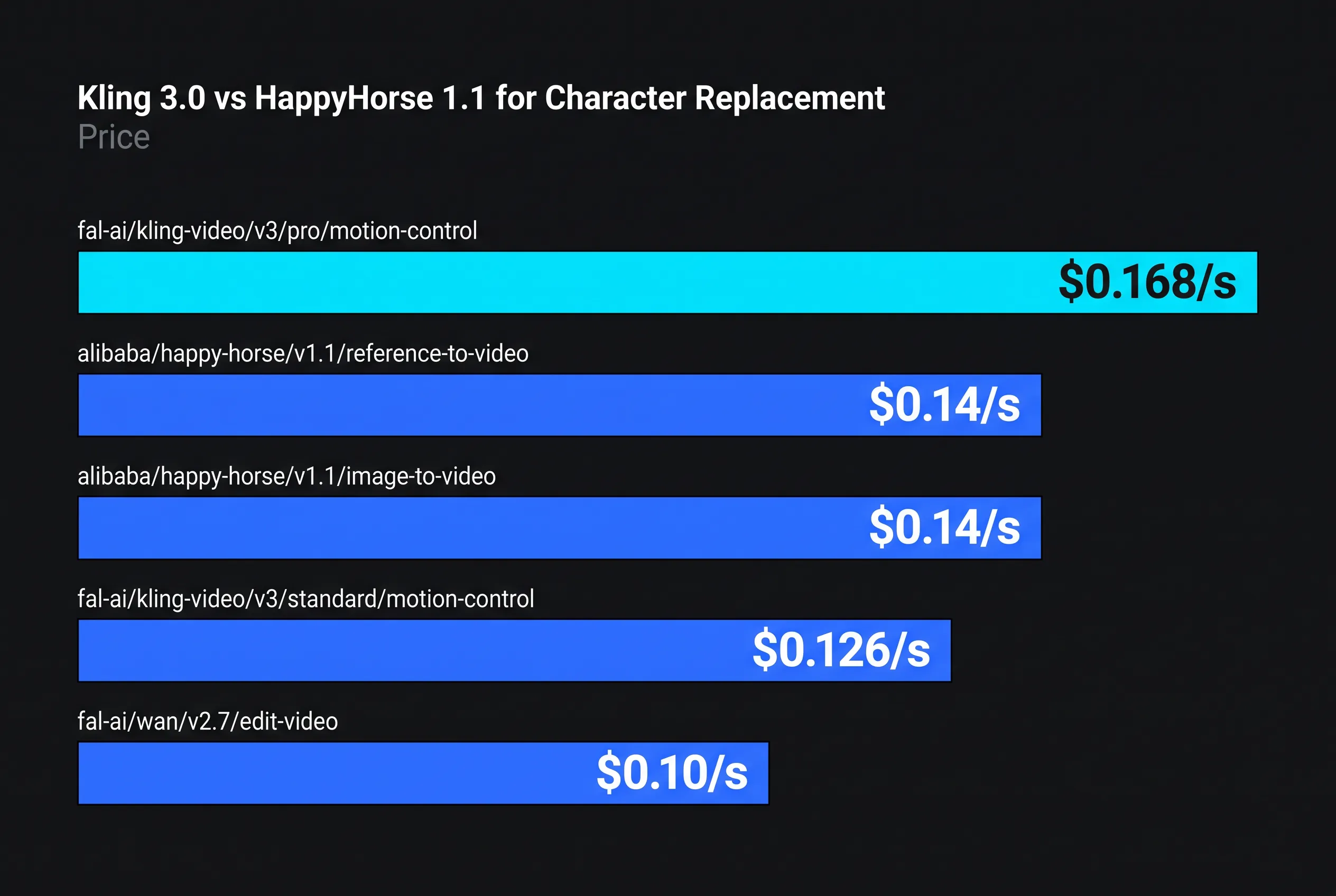
Per-second list prices, read from the fal.ai endpoints on the date above.
| Model | Job | Price |
|---|---|---|
| Kling 3.0 Pro Motion Control | motion transfer | $0.168/s |
| Kling 3.0 Standard Motion Control | motion transfer | $0.126/s |
| HappyHorse 1.1 reference-to-video | refs to new shot | $0.14/s at 720p |
| HappyHorse 1.1 image-to-video | animate a photo | $0.14/s at 720p |
| Wan 2.7 edit-video | video edit with a reference image (tested, not routed to) | $0.10/s |
A 10-second clip is therefore $1.68 on Kling Pro motion control, $1.40 on HappyHorse, $1.00 on Wan 2.7 edit (which we do not route to). Nothing here is priced per "credit", so the cost is knowable before you press the button.
What each one actually takes as input
Kling 3.0 Motion Control wants a reference video (3–30 seconds) plus a character image. It extracts the motion path and re-performs it with your character. The parameter that decides everything is character_orientation: with video, the reference clip drives framing and the model accepts an elements entry that binds the face. With image, the framing follows your still and that facial binding is silently a no-op — which is exactly the configuration people complain about when identity drifts.
HappyHorse 1.1 has three endpoints — text-to-video, image-to-video and reference-to-video. Its video-edit endpoint (HappyHorse video-edit (1.0)) is still version 1.0; it is what our autopilot uses to replace a person in an existing Reel, but it is a separate model with its own limits (3–60 seconds in, 15 seconds out). Reference-to-video takes up to nine images of your character and a prompt, outputs 720p or 1080p in nine aspect ratios including 9:16 and 4:5, with native audio and multilingual lip-sync. The 1.1 endpoints do not ingest a source video, so they cannot copy a clip's choreography.
That single line is the whole decision: if the movement has to match a specific existing clip, the HappyHorse 1.1 generators cannot do it — use Kling Motion Control, or the video-edit model when the footage itself must be kept.
Where each one wins
| Scenario | Better pick | Why |
|---|---|---|
| Dance / choreography copied from a Reel | Kling 3.0 Motion Control Pro | only one of the two that ingests motion |
| Talking head, your face, your script | HappyHorse 1.1 i2v | native audio and lip-sync in one call |
| "Me in a scene I describe" | HappyHorse 1.1 ref2v | up to 9 refs, true 9:16 output |
| Narrative clip where the background must stay | HappyHorse video-edit (1.0) | edits the source video; Wan 2.7 edit also exists, but we tested it and do not route to it |
Two field notes from our own runs. Kling Motion Control's Pro tier holds faces visibly better than Standard — the 33% price gap is worth it when the face is the point. And on HappyHorse, drift grows with motion amplitude: five seconds of restrained movement stays clean where ten seconds of big gestures starts sliding.
The honest caveats
Kling's real-face policy allows public figures but is not blanket permission — a rejection is a policy decision, not a bug.
HappyHorse defaults to a 16:9 aspect ratio, so a vertical creator gets a landscape clip unless they set aspect_ratio to 9:16 or 4:5. The default resolution is 1080p, which bills about twice the $0.14 quoted for 720p, so missing both defaults is a wasted generation and a bigger invoice.
And neither is a face-swap tool in the inswapper sense: they regenerate the person, so wardrobe and proportions come from your references, not from the source clip.
October 2026 update: a third contender
On 18 October 2026 there are three serious ways to replace a person in an existing clip, not two. HappyHorse video-edit (1.0) is what our autopilot runs today. Kling O3 edit costs $0.14 per second, takes 3–15 second inputs, and lets you bind a face with @Element1. MiniMax H3 Max Recast takes 5–30 second inputs, accepts one to four reference photos (one per person, replaced left to right) and is reported at $0.30 to $0.45 per output second. None of the three has been certified by anyone for identity, and we have not yet put Recast or the newer Kling editor through our own test, so this article makes no quality claim about them. Our Recast guide, Kling O3 edit guide and the walk-through of replacing a person in a video have the limits of each.
How to do this without code: You do not choose a model for character replacement; the autopilot picks the path for the Reel you paste. In AutoHustle this is the autopilot: paste the Reel link, add one photo of yourself and confirm the plan (about 4 credits per second of finished video, so 60 credits for a full 15-second call; analysing the Reel is free). See How to put your face in any Reel and Recreate an Instagram Reel.
Related reading: AI Video Generation Pricing Compared (October 2026): What a Second Really Costs · HappyHorse Video Edit on fal: What It Costs to Replace a Person in a Clip, and the Limits (October 2026)
For developers: the fal endpoints behind this article
Prices in the article are per-second or per-unit rates from the fal.ai pricing API on the dates stated; re-check them before you build, because endpoints reprice without notice. The IDs:
| Model | fal endpoint |
|---|---|
| Kling 3.0 Pro Motion Control | fal-ai/kling-video/v3/pro/motion-control |
| Kling 3.0 Standard Motion Control | fal-ai/kling-video/v3/standard/motion-control |
| HappyHorse 1.1 reference-to-video | alibaba/happy-horse/v1.1/reference-to-video |
| HappyHorse 1.1 image-to-video | alibaba/happy-horse/v1.1/image-to-video |
| Wan 2.7 edit-video | fal-ai/wan/v2.7/edit-video |
| HappyHorse video-edit (1.0) | alibaba/happy-horse/video-edit |