Kling vs Wan for Image-to-Video: $0.14 vs $0.05 and What the Difference Buys
Two of the most-used image-to-video models, almost 3x apart on base price after Wan 3.0 Prime. Where Kling's extra spend is visible, how Wan's price changes with resolution, and the one job Wan's older line does.
These two carry most of the practical image-to-video work in 2026. They are close enough in quality that the decision comes down to two things: what the clip contains, and whether you need to edit an existing video.
Prices re-checked against the live endpoints on 4 September 2026; Wan 3.0 Prime's resolution tiers are from 18 October.
The line-up
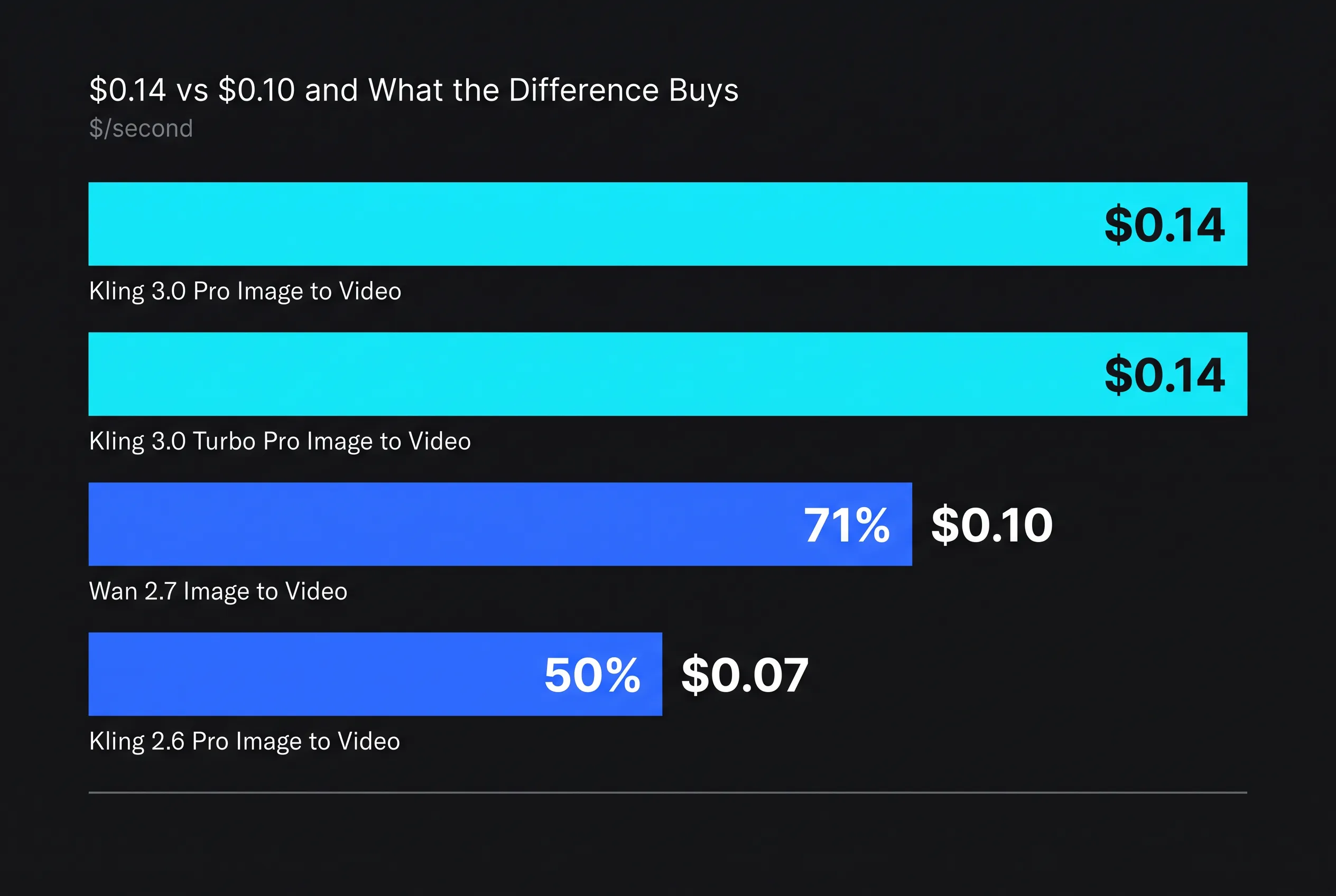
| Model | $/second | 10s clip |
|---|---|---|
| Wan 3.0 Prime Image to Video | $0.05 | $0.50 |
| Kling 2.6 Pro Image to Video | $0.07 | $0.70 |
| Wan 2.7 Image to Video | $0.10 | $1.00 |
| Kling 3.0 Turbo Standard Image to Video | $0.112 | $1.12 |
| Kling 3.0 Pro Image to Video | $0.14 | $1.40 |
| Kling 3.0 Turbo Pro Image to Video | $0.14 | $1.40 |
Wan 3.0 Prime arrived in the late-August 2026 wave and halved the family's rate — read into our catalogue on 4 September 2026, a generation newer than 2.7, at $0.05 per output second, with an optional end frame and generated audio. The endpoint publishes no maximum length of its own; we cap it at 15 seconds so the quote and the credit charge cannot drift apart. It takes the head of the Wan image line. Wan 2.7 stays worth knowing about for one reason covered below: it is the only member of the family that accepts a driving audio track or a clip to continue from.
Note also the spread inside Kling itself: the 2.6 Pro endpoint is half the price of 3.0 Pro, and the new Turbo Standard tier sits between them at $0.112. For anything without a human face, that is the most overlooked saving in the category. The Kling 3.0 Standard tier that shipped alongside it is priced identically to Pro at $0.14 — there is no job where it is the correct choice.
Where Kling 3.0 earns the extra
Faces and human motion. Cloth and hair dynamics, weight settling, contact points. If a person is on screen and the clip will be watched full-screen, this is where the money goes.
Native audio. Generated in the same call, though English and Chinese only.
Ecosystem. Kling covers jobs Wan does not: Motion Control for copying a reference clip's movement, AI Avatar for talking heads, O3 Reference to Video for character consistency. Staying inside one family is worth something operationally.
Where Wan wins
The lowest base rate, but check the resolution. Wan 3.0 Prime's listed unit is $0.05 per output second; third-party trackers report the real per-second price rising to roughly $0.068 at 480p, $0.14 at 720p and $0.28 at 1080p, which puts 720p level with Kling 3.0 Pro. Wan 2.7 is a flat $0.10 at 720p and 1080p.
Video editing, which Kling's image endpoints cannot do at all. Wan 2.7 Edit Video at $0.10 per second takes a source video plus a reference image and a prompt, keeps the original background, lighting and camera move, and swaps the performer. Inputs run 2–10 seconds. We tested it and do not route to it, and Kling's own video-edit endpoint (O3, $0.14 per second, 3–15 second inputs) now covers the same job; see the Kling O3 edit guide.
Audio and continuation. Wan 2.7 image-to-video accepts a driving audio track and a clip to continue from; the cheaper 3.0 Prime endpoint takes an image and a prompt and nothing else. If you need either input, the older row is still the one to call.
Policy. Wan is open-weights from a different vendor, which in practice means fewer surprises on real-face inputs than the models that refuse them outright.
How we actually route
- No person in frame — product, object, landscape: Wan 3.0 Prime at $0.05, or Kling 2.6 Pro at $0.07 if you prefer the Kling look. Nothing more expensive is justified.
- A person, watched full screen: Kling 3.0 Pro at $0.14.
- An existing clip that must keep its background: a video-edit model, not an image-to-video one (our choice is HappyHorse video-edit; Kling O3 edit at $0.14 is the alternative we are testing).
- Predictable billing above all: Wan 2.7, for the flat rate. Wan 3.0's price depends on the resolution you request, and the full 3.0 tier above Prime lists only a base unit.
What neither does
Copy a specific dance. Both animate a still; neither ingests motion from a source clip. That is Kling 3.0 Pro Motion Control at $0.168 per second, with character_orientation set to video — on image the face-binding element is a silent no-op.
The honest summary
At this quality level the model is rarely what makes a clip good. Clip length, prompt structure and input image quality move the result far more than a nine-cent-per-second difference. Pick on capability — face, edit, or neither — and spend the saved attention on the input.
How to do this without code: Animating a photo needs no model choice: the tool uses the default and quotes the price. In AutoHustle this is the Animate photo tool: one photo, an optional sentence and a length slider (about 2 credits per second on the default model, quoted before you press Generate). See How to animate a photo and Animate a photo.
Related reading: Kling 3.0 Turbo Pro vs Pro: Same Price on fal, So What Is the Difference? (October 2026) · Luma Ray 3.2 vs Kling 3.0 for Image-to-Video: Watch the Billing Unit